
SIC Classic Earrings for G8xF
Related Articles
?3DMax] VrayArt VRay Exterior Training Models and work files only
On 04-Jul-15
by
VrayArt VRay Exterior Training Models and work files only max | 3D models |...
VrayArt VRay Exterior Training Models and work files only max | 3D models |...
Interrogation II: Core Pack
On 23-Feb-25
by
Note: PRODUCT BELOW DESCRIBED FOR DAZ STUDIO. POSER VERSION IS AVAILABLE AS...
Note: PRODUCT BELOW DESCRIBED FOR DAZ STUDIO. POSER VERSION IS AVAILABLE AS...
[Max] VrayArt VRay Exterior Training Models and work files only
On 18-Jul-16
by
VrayArt VRay Exterior Training Models and work files only max | 3D models |...
VrayArt VRay Exterior Training Models and work files only max | 3D models |...
Legacy Davo Cattle Drive aka Pony-Girl Daz Studio G8
On 11-Feb-24
by
Pony-girl and human cattle fans will love this set of riding, branding and...
Pony-girl and human cattle fans will love this set of riding, branding and...
Labworks 2 Equipment Pack 1 for DS and Poser
On 21-Nov-23
by
Product: Labworks 2 Equipment Pack 1 for Daz Studio and Poser Vendor/Creator:...
Product: Labworks 2 Equipment Pack 1 for Daz Studio and Poser Vendor/Creator:...
Zero-G Bundle
On 12-Apr-24
by
Description Zero-G Bundle Includes: Madlab 5: Zero-G Core Pack: - Chamber:...
Description Zero-G Bundle Includes: Madlab 5: Zero-G Core Pack: - Chamber:...
BG3D Maryam for G9 - Bonus Set
On 11-Nov-25
by
DESCRIPTION: My new character Maryam with Bonus Halloween Materials are now...
DESCRIPTION: My new character Maryam with Bonus Halloween Materials are now...
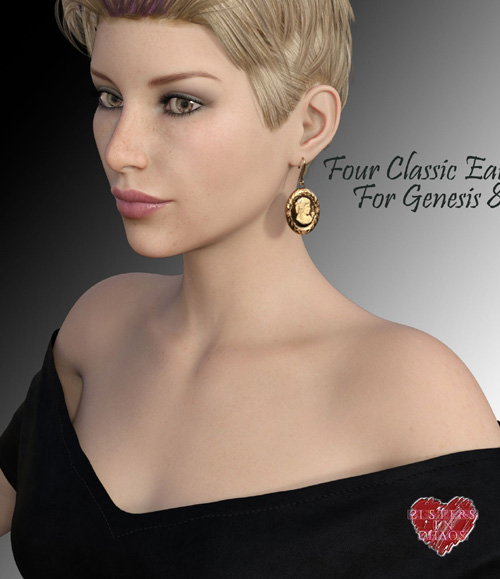
This is a set of 4 classic earrings for Genesis 8 or 8.1: There is a cameo style on a hook, a Vermeer pearl on a short chain, a Murano bead set, and a plain chunky cut stone. Each style has four mats; the Pink Pearl is very subtle and only shows when rendered, it runs off the Glitter color (which means you can color the pearl other things by adding more glitter and different colors). The Cameo will take any little picture image, just apply it according to the directions on the template.
Templates are included as well for the earrings.
Be sure to select G8 or 8.1 before you load the earrings, or they will load close to the ears-- but not quite in the right spot. Use the node tool to select the earring you want to color, it's easier than looking on the Scene tab through all of G8's parts. Repositioning is easiest with the Universal tool if you need to rotate an earring for a pose.
Product ID: 104649-DAZ
Detail Link: https://www.daz3d.com/sic-classic-earrings-for-g8xf
DOWNLOAD: You must login to show this link. No account? Create One
Category: Daz & Poser
Detail Link: https://www.daz3d.com/sic-classic-earrings-for-g8xf
DOWNLOAD: You must login to show this link. No account? Create One