
FF's Adventures Gone Wrong - Camera Anchor and Poses for Genesis 9
Related Articles
Interrogation II: Core Pack
On 23-Feb-25
by
Note: PRODUCT BELOW DESCRIBED FOR DAZ STUDIO. POSER VERSION IS AVAILABLE AS...
Note: PRODUCT BELOW DESCRIBED FOR DAZ STUDIO. POSER VERSION IS AVAILABLE AS...
Legacy Davo Cattle Drive aka Pony-Girl Daz Studio G8
On 11-Feb-24
by
Pony-girl and human cattle fans will love this set of riding, branding and...
Pony-girl and human cattle fans will love this set of riding, branding and...
Zero-G Bundle
On 12-Apr-24
by
Description Zero-G Bundle Includes: Madlab 5: Zero-G Core Pack: - Chamber:...
Description Zero-G Bundle Includes: Madlab 5: Zero-G Core Pack: - Chamber:...
[Tutorials] Ruby On Rails 3 Tutorial - Learn Rails By Example
On 24-May-16
by
Ruby On Rails 3 Tutorial - Learn Rails By Example FLV | 1024x768 | MP3 Stereo...
Ruby On Rails 3 Tutorial - Learn Rails By Example FLV | 1024x768 | MP3 Stereo...
Vendo Box Road Show
On 08-Sep-25
by
Product: Vendo Box "ROAD SHOW" For Daz Studio and Poser...
Product: Vendo Box "ROAD SHOW" For Daz Studio and Poser...
Sonsy 2023 for Genesis 9
On 08-Apr-24
by
Sonsy 2023 for Genesis 9 SONSY 2023 FOR GENESIS 9 The SONSY 2023 FOR GENESIS 9...
Sonsy 2023 for Genesis 9 SONSY 2023 FOR GENESIS 9 The SONSY 2023 FOR GENESIS 9...
Terminus 5 Decapitators "Equipment Pack 2" For DazStudio
On 29-Feb-24
by
Product: Terminus 5 Decapitation Expansion Pack 2 for Daz Studio...
Product: Terminus 5 Decapitation Expansion Pack 2 for Daz Studio...
Required Products: Genesis 9 Starter Essentials
Details
Poses tell your story. But a really good camera angle takes a good pose to a higher level, elevating the tale with added drama and tension.
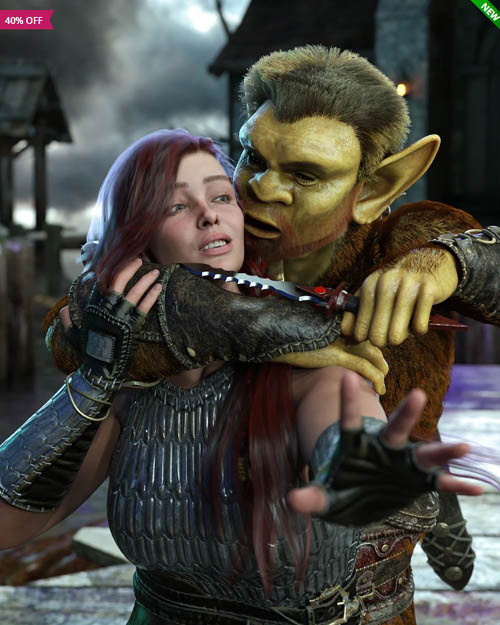
FF's Adventures Gone Wrong - Camera Anchor and Poses for Genesis 9 helps you, the artist achieve this goal by giving you 28 poses for Genesis 9 (20 single stance poses and 4 two-person vignette poses), 104 Camera Presets, and introduces the Camera Anchor - a new concept of combining poses with cameras that you can chose the best angle that will help you tell your story.
The basic workings of the Camera Anchor are as follows. You load in your Genesis 9 figure; pick one of the poses in this set to use (or, conversely, you can use the Camera Anchors or any of the included Camera Presets with any of your poses in your runtime); apply the pose to your Genesis 9 figure and load in the Camera Anchor associated with the pose you've chosen. The Camera Anchor will load in with 4 or 5 attached Cameras, all set up to make the pose look good and/or more dramatic. Parent your Genesis 9 figure (or figures, if using one of the two-person vignette poses) to the Camera Anchor, and use it as a handle to move both the figure(s) and the associated cameras around in your scene. Note - the Camera Anchor is visible in your scene/viewport, but it will not appear in your renders.
In addition, there is included a PDF tutorial on how the Camera Anchor works, as well as some tips on using the DazStudio Cameras to help you raise the bar on your renders.
As always, FeralFey poses are fact-checked for gravity, balance, and realism.
Product ID: 102653-DAZ
Detail Link: https://www.daz3d.com/ffs-adventures-gone-wrong--camera-anchor-and-poses-for-genesis-9
DOWNLOADYou must login to show this link. No account? Create One
Category: Daz & Poser
Detail Link: https://www.daz3d.com/ffs-adventures-gone-wrong--camera-anchor-and-poses-for-genesis-9
DOWNLOADYou must login to show this link. No account? Create One