
The Gnomon Workshop - Creature Grooming Techniques in Houdini
Related Articles
[3DMax] Gnomon Workshop Texture Library Bundle
On 02-Aug-15
by
Gnomon Workshop Texture Library Bundle JPEG | TIFF | Textures | 37.2 GB...
?3DMax] VrayArt VRay Exterior Training Models and work files only
On 04-Jul-15
by
VrayArt VRay Exterior Training Models and work files only max | 3D models |...
[Tutorials] 3DBuzz - Technical Rigging Houdini Volumes 1 - 5
On 20-Mar-16
by
3DBuzz - Technical Rigging Houdini Volumes 1 - 5...
[Tutorials] FXPHD : VRY102 Introduction to V-Ray 3 for Maya
On 14-May-16
by
FXPHD : VRY102 Introduction to V-Ray 3 for Maya | 4.0 GB...
Evermotion Archmodels vol 124
On 20-Aug-15
by
Evermotion Archmodels vol 124 c4d | obj | fbx | max | 3D models | 15.6 GB...
Evermotion Archmodels vol 124 (148 highly detailed 3d models)
On 02-Nov-15
by
Evermotion Archmodels vol 124 c4d | obj | fbx | max | 3D models | 15.6 GB...
[Tutorials] FXPHD : MYA224 Maya Foundations: Simulation and Effects
On 14-May-16
by
FXPHD : MYA224 Maya Foundations: Simulation and Effects | 3.5 GB...
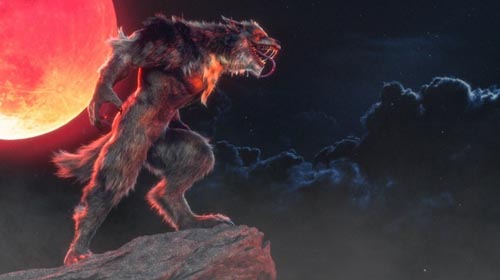
The Gnomon Workshop - Creature Grooming Techniques in Houdini
Duration 3h 5m Project Files Included MP4
You must login to show this link. No account? Create One
Category: Other 3D
Info:
Learn how to create convincing creature grooms in Houdini with this 3-hour workshop by Groomer at Digital Domain, Luis Cadavid. A discussion of the concepts and tools that are used in this workshop takes precedence at the beginning before Luis jumps into Maya to explore his creature model. At this stage, the importance is on getting to know the volumes that will be used to create the creature groom and involves observing lots of reference materials before exporting the model to Houdini.
Once in Houdini, Luis provides an introduction to how Houdini creates hair before he prepares all of the objects and creates the various VDBs, and separates the mesh to create the groom. You'll learn how to take advantage of the tools that Luis widely uses, including the Curve Advect Tool, Guide Process: Bend, Guide Process: Set Direction, Guide Process: Lift, Length, Curve Mask, and Noise Mask. You'll also discover how to create your own custom shortcuts to make your workflow faster and more efficient.
With knowledge of all the tools defined, Luis then starts the process of creating the guides for the face of the werewolf, adding volume and shape to the guides using various attributes. He creates the hair and various sized clumps before moving on to creating the guides for the body, legs, ears, and tail. He also paints the attributes that he will later combine together. Once the first pass of the groom is done, Luis shares how he tests materials and HDRIs and sets up the camera so he can get an idea of how the groom is working.
By completing this workshop, you will have covered all of the bases needed to begin creating your own grooms. This tutorial is intended for artists with a basic to medium level of understanding of grooming.
SOFTWARE USED
Arnold Maya Houdini Nuke
DOWNLOAD HERE :
https://rapidgator.net/file/2ab48e246b6329d15a2498202318e866/TheGnomonWorkshopCreatureGroomingTechniquesinHoudini.part7.rar.html
https://rapidgator.net/file/7a2f1627c5f708948ee770c2f2ee9aa6/TheGnomonWorkshopCreatureGroomingTechniquesinHoudini.part6.rar.html
https://rapidgator.net/file/df121c005cf0dc10ee35503a630e0436/TheGnomonWorkshopCreatureGroomingTechniquesinHoudini.part5.rar.html
https://rapidgator.net/file/1eff7e6304d49cc8ac40e96803bdc2af/TheGnomonWorkshopCreatureGroomingTechniquesinHoudini.part4.rar.html
https://rapidgator.net/file/d67fdfaa3de57dabf48e564df9c48201/TheGnomonWorkshopCreatureGroomingTechniquesinHoudini.part3.rar.html
https://rapidgator.net/file/7cde9173e6f5cf3acf65d9827517ac24/TheGnomonWorkshopCreatureGroomingTechniquesinHoudini.part2.rar.html
https://rapidgator.net/file/b16f602004dcfa8a30492c951df4f93f/TheGnomonWorkshopCreatureGroomingTechniquesinHoudini.part1.rar.html
Learn how to create convincing creature grooms in Houdini with this 3-hour workshop by Groomer at Digital Domain, Luis Cadavid. A discussion of the concepts and tools that are used in this workshop takes precedence at the beginning before Luis jumps into Maya to explore his creature model. At this stage, the importance is on getting to know the volumes that will be used to create the creature groom and involves observing lots of reference materials before exporting the model to Houdini.
Once in Houdini, Luis provides an introduction to how Houdini creates hair before he prepares all of the objects and creates the various VDBs, and separates the mesh to create the groom. You'll learn how to take advantage of the tools that Luis widely uses, including the Curve Advect Tool, Guide Process: Bend, Guide Process: Set Direction, Guide Process: Lift, Length, Curve Mask, and Noise Mask. You'll also discover how to create your own custom shortcuts to make your workflow faster and more efficient.
With knowledge of all the tools defined, Luis then starts the process of creating the guides for the face of the werewolf, adding volume and shape to the guides using various attributes. He creates the hair and various sized clumps before moving on to creating the guides for the body, legs, ears, and tail. He also paints the attributes that he will later combine together. Once the first pass of the groom is done, Luis shares how he tests materials and HDRIs and sets up the camera so he can get an idea of how the groom is working.
By completing this workshop, you will have covered all of the bases needed to begin creating your own grooms. This tutorial is intended for artists with a basic to medium level of understanding of grooming.
SOFTWARE USED
Arnold Maya Houdini Nuke
DOWNLOAD HERE :
https://rapidgator.net/file/2ab48e246b6329d15a2498202318e866/TheGnomonWorkshopCreatureGroomingTechniquesinHoudini.part7.rar.html
https://rapidgator.net/file/7a2f1627c5f708948ee770c2f2ee9aa6/TheGnomonWorkshopCreatureGroomingTechniquesinHoudini.part6.rar.html
https://rapidgator.net/file/df121c005cf0dc10ee35503a630e0436/TheGnomonWorkshopCreatureGroomingTechniquesinHoudini.part5.rar.html
https://rapidgator.net/file/1eff7e6304d49cc8ac40e96803bdc2af/TheGnomonWorkshopCreatureGroomingTechniquesinHoudini.part4.rar.html
https://rapidgator.net/file/d67fdfaa3de57dabf48e564df9c48201/TheGnomonWorkshopCreatureGroomingTechniquesinHoudini.part3.rar.html
https://rapidgator.net/file/7cde9173e6f5cf3acf65d9827517ac24/TheGnomonWorkshopCreatureGroomingTechniquesinHoudini.part2.rar.html
https://rapidgator.net/file/b16f602004dcfa8a30492c951df4f93f/TheGnomonWorkshopCreatureGroomingTechniquesinHoudini.part1.rar.html