
Exnem Doughnuts Props for DAZ Studio and IRAY
Related Articles
?3DMax] VrayArt VRay Exterior Training Models and work files only
On 04-Jul-15
by
VrayArt VRay Exterior Training Models and work files only max | 3D models |...
VrayArt VRay Exterior Training Models and work files only max | 3D models |...
[3DMax] Gnomon Workshop Texture Library Bundle
On 02-Aug-15
by
Gnomon Workshop Texture Library Bundle JPEG | TIFF | Textures | 37.2 GB...
Gnomon Workshop Texture Library Bundle JPEG | TIFF | Textures | 37.2 GB...
[Max] VrayArt VRay Exterior Training Models and work files only
On 18-Jul-16
by
VrayArt VRay Exterior Training Models and work files only max | 3D models |...
VrayArt VRay Exterior Training Models and work files only max | 3D models |...
Interrogation II: Core Pack
On 23-Feb-25
by
Note: PRODUCT BELOW DESCRIBED FOR DAZ STUDIO. POSER VERSION IS AVAILABLE AS...
Note: PRODUCT BELOW DESCRIBED FOR DAZ STUDIO. POSER VERSION IS AVAILABLE AS...
Exnem Pizza Props for Daz Studio IRAY
On 17-Dec-24
by
This product brings you a collection of assorted pizza props of great quality...
This product brings you a collection of assorted pizza props of great quality...
Labworks 2 Equipment Pack 1 for DS and Poser
On 21-Nov-23
by
Product: Labworks 2 Equipment Pack 1 for Daz Studio and Poser Vendor/Creator:...
Product: Labworks 2 Equipment Pack 1 for Daz Studio and Poser Vendor/Creator:...
Maxwell Render Full Material Library 2006-2013
On 13-Jul-15
by
Maxwell Render Full Material Library 2006-2013 MXM | JPEG | Shaders | 8.82 GB...
Maxwell Render Full Material Library 2006-2013 MXM | JPEG | Shaders | 8.82 GB...
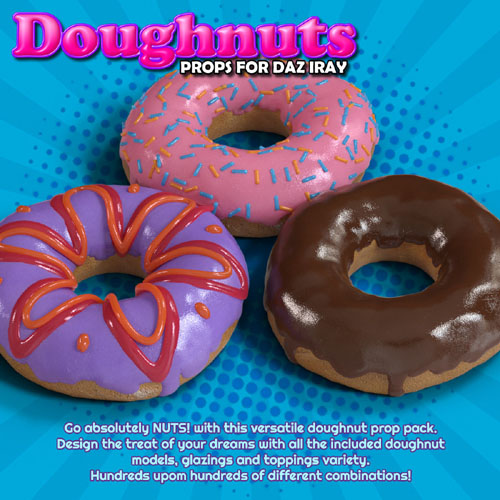
Each doughnut prop is a high quality and very detailed object, complete with different material sections for the bread, glazing and 2 different toppings (caramel lines, sprinkles, etc)
All materials are for Iray renderer only and use subsurface scattering and translucency as required to make the most realistic and good looking props possible.
--------------------------------------
System Requirements:
Daz Studio 4.8+
--------------------------------------
Ownership Statement:
All of this product's content was created by Exnem
--------------------------------------
Installation Instructions:
Extract the zip-archive with your unzip program:
- Open your unzip program and press the button -Extract To-
- Select the folder with you DAZ Studio libraries (e.g.: C:\Users\Public\Documents\My DAZ 3D Library)
- Make sure that an option to extract full paths is selected to make sure you keep the right folder structures within your DAZ folder.
--------------------------------------
Usage Tips or Limitations:
Go to "Props/Exnem/Doughnuts" folder and select your desired prop.
Double click to add it to the world.
Once loaded you can use the default dials in the parameters rollout window to change size, rotation and position of your prop.
You can change the glaze and toppings using the materials provided in the "Materials" folder.
!Smart Props are also included for Genesis 8 Figures, these attach to the figure's right hand and you can then use the provided pose from the "Poses" folder to match the doughnut.
The "!Box Empty" and "!Box Full" are grouped objects. You can select the lid to open or close it using the parameter dials. Also the doughnuts inside the box can me manipulated and changed materials just like the single props.
Product ID: 154572-RO
Detail Link: https://www.renderosity.com/marketplace/products/154572/exnem-doughnuts-props-for-daz-studio-and-iray
DOWNLOADYou must login to show this link. No account? Create One
Category: Daz & Poser
Detail Link: https://www.renderosity.com/marketplace/products/154572/exnem-doughnuts-props-for-daz-studio-and-iray
DOWNLOADYou must login to show this link. No account? Create One