
UPDATED Measure Metrics Latest For DAZ Studio 4.23
Related Articles
?3DMax] VrayArt VRay Exterior Training Models and work files only
On 04-Jul-15
by
VrayArt VRay Exterior Training Models and work files only max | 3D models |...
VrayArt VRay Exterior Training Models and work files only max | 3D models |...
Great Art Now Daz3D Tutorial Bundle
On 02-Jun-23
by
...
...
Chassia Outfit G8F/G9F
On 11-Dec-23
by
Give your ladies a new sexy outfit, it's sportive, but also ideal for...
Give your ladies a new sexy outfit, it's sportive, but also ideal for...
Interrogation II: Core Pack
On 23-Feb-25
by
Note: PRODUCT BELOW DESCRIBED FOR DAZ STUDIO. POSER VERSION IS AVAILABLE AS...
Note: PRODUCT BELOW DESCRIBED FOR DAZ STUDIO. POSER VERSION IS AVAILABLE AS...
Making Faces ...and Realistic Bodies Too!
On 16-Dec-23
by
Have you ever wanted to put your own face, or perhaps a family member, on a 3D...
Have you ever wanted to put your own face, or perhaps a family member, on a 3D...
Labworks 2 Equipment Pack 1 for DS and Poser
On 21-Nov-23
by
Product: Labworks 2 Equipment Pack 1 for Daz Studio and Poser Vendor/Creator:...
Product: Labworks 2 Equipment Pack 1 for Daz Studio and Poser Vendor/Creator:...
[Max] VrayArt VRay Exterior Training Models and work files only
On 18-Jul-16
by
VrayArt VRay Exterior Training Models and work files only max | 3D models |...
VrayArt VRay Exterior Training Models and work files only max | 3D models |...
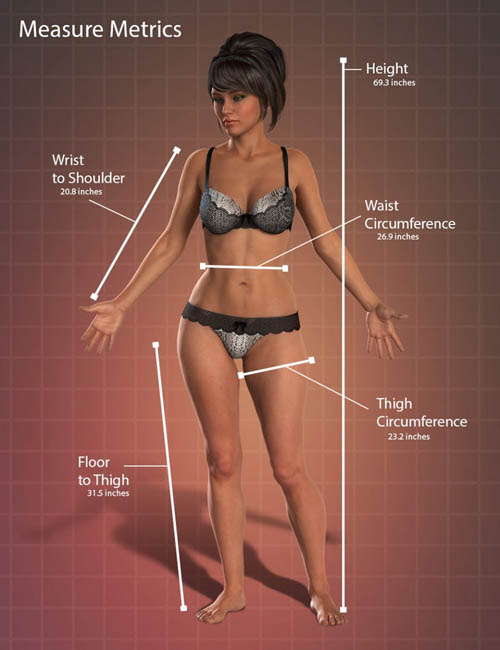
UPDATED Measure Metrics Latest For DAZ Studio 4.23
Have you ever loaded a figure into DAZ Studio and thought to yourself, ”I wish there was an easy way to get accurate measurements?”
Have you wanted a way to adjust your figure’s proportions and see the measurements in real time?
Now you can!
The Measure Metrics plug-in will allow you to measure the length, diameter or angle of figures and props in your scene. It uses both Metric and US inches/feet. By using the Tape Measure, Tailor’s Tape or the Protractor, you can remove the “guesswork” from your artwork.
Measure Metrics comes with “Pre-set” nodes to help you measure the dimensions of your favorite figures. It also allows you to set up your own nodes to measure any kind of props or even empty space between figures within your scene.
A script included with Measure Metrics allows you to configure morphs which control the dimensions of your figure, allowing you to set the dimensions and have the figure automatically adjust the morphs to match the dimensions you entered.
Measure your figure’s or prop’s dimensions or configure the tool to automatically set your figure to dimensions that you specify without having to adjust dozens of morph sliders.
This is a fun and powerful tool!
Included:
16684_FigureMetricsforDAZStudio46Mac_1.4_ds.zip
DS4_MeasureMetrics_1.13.0.1_Mac32.zip
DS4_MeasureMetrics_1.13.0.1_Mac64.zip
IM00016684-02_MeasureMetricsforDAZStudio422Win64bit.zip
IM00016684-20_FigureMetricsforDAZStudio46.zip
IM00016684-21_FigureMetricsforDAZStudio46Content.zip
16684_FigureMetricsforDAZStudio46Win_1.4_ds.exe
DS4_MeasureMetrics_1.13.0.1_Win32.exe
DS4_MeasureMetrics_1.13.0.1_Win64.exe
ATTENTION!
THE PROVIDED SERIAL SHOULD WORK WITH THIS VERSION OF MEASURE METRICS!
Bunkr Download!
Product ID: UPDATED-Measure-Metrics-Latest-For-DAZ-Studio-4.23
Detail Link: https://www.daz3d.com/measure-metrics-for-daz-studio
DOWNLOADYou must login to show this link. No account? Create One
Category: Daz & Poser
Detail Link: https://www.daz3d.com/measure-metrics-for-daz-studio
DOWNLOADYou must login to show this link. No account? Create One