
Panskins Total Bundle
Related Articles
[3DMax] Gnomon Workshop Texture Library Bundle
On 02-Aug-15
by
Gnomon Workshop Texture Library Bundle JPEG | TIFF | Textures | 37.2 GB...
Gnomon Workshop Texture Library Bundle JPEG | TIFF | Textures | 37.2 GB...
Panskins Garter Magic for DAZ Studio Genesis 8 Female
On 25-Mar-24
by
Using Panskins Garter Magic is super easy. Just load the asset onto your...
Using Panskins Garter Magic is super easy. Just load the asset onto your...
Interrogation II: Core Pack
On 23-Feb-25
by
Note: PRODUCT BELOW DESCRIBED FOR DAZ STUDIO. POSER VERSION IS AVAILABLE AS...
Note: PRODUCT BELOW DESCRIBED FOR DAZ STUDIO. POSER VERSION IS AVAILABLE AS...
Labworks 2 Equipment Pack 1 for DS and Poser
On 21-Nov-23
by
Product: Labworks 2 Equipment Pack 1 for Daz Studio and Poser Vendor/Creator:...
Product: Labworks 2 Equipment Pack 1 for Daz Studio and Poser Vendor/Creator:...
Evermotion Archmodels vol 149 - update
On 22-Oct-15
by
Evermotion Archmodels vol 149 c4d | obj | fbx | max | 3D models | 10.13 GB...
Evermotion Archmodels vol 149 c4d | obj | fbx | max | 3D models | 10.13 GB...
Vendo Box Road Show
On 08-Sep-25
by
Product: Vendo Box "ROAD SHOW" For Daz Studio and Poser...
Product: Vendo Box "ROAD SHOW" For Daz Studio and Poser...
BG3D Maryam for G9 - Bonus Set
On 11-Nov-25
by
DESCRIPTION: My new character Maryam with Bonus Halloween Materials are now...
DESCRIPTION: My new character Maryam with Bonus Halloween Materials are now...
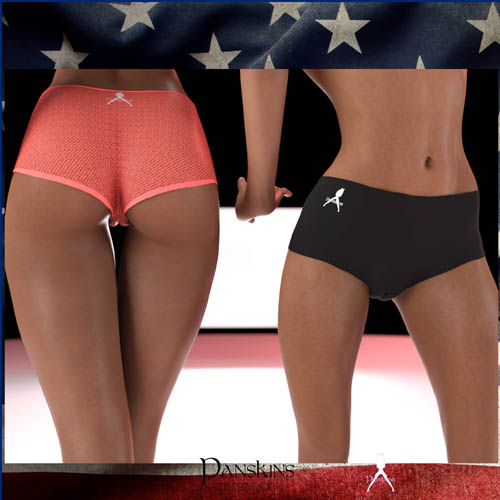
Get all five of the Panskins clothing assets for Daz Genesis 8 Female and Genesis 8.1 Female all at once.
Five quality pieces of dForce clothing with matching and complimentary materials. This includes:
Panskins Tights
Panskins EZ Access Pantyhose
Panskins Athletic Shorts
Panskins Venusian Top
Panskins Cold Shoulder Top
Once the product bundle is unzipped, you'll find all five of them under "People - Clothing - Causam3D - Panskins - asset_name (eg "Tights").
Using any of the Panskins line of active wear is super easy.
Just load the asset onto your character, choose a pose, and then simulate or animate.
Depending on your character's shape, you may need to employ the easy-to-use Poke Through Fix morph. Simply click the plus sign on the slider until any poke through in your shot disappears, exactly as with any Causam3d clothing product.
EZ Access Pantyhose is so named because these panty hose are crotchless. There are a wide variety of colors available for Panskins EZ Access Panty Hose, and two sheer setting which gives the EZ Access Panty Hose see-through looks.
To turn off the logo on any of the items, simply use the Logo Off preset. You can also change the logo from white to black and back again with the provided presets.
Thanks for checking out Panskins! We hope you enjoy this product and make wonderful renders with it.
To install:
Unzip into your Daz3D directory, either the program folder or your "My Library" folder.
To Use:
Select your character (either a G8 or G8.1) and then load the garment, then run the dForce simulation. That's it, you're done!
Product ID: renderhub-Panskins-Total-Bundle
Detail Link: https://www.renderhub.com/causam3d/panskins-total-bundle
DOWNLOADYou must login to show this link. No account? Create One
Category: Daz & Poser
Detail Link: https://www.renderhub.com/causam3d/panskins-total-bundle
DOWNLOADYou must login to show this link. No account? Create One