
AJ Medieval Room
Related Articles
?3DMax] VrayArt VRay Exterior Training Models and work files only
On 04-Jul-15
by
VrayArt VRay Exterior Training Models and work files only max | 3D models |...
VrayArt VRay Exterior Training Models and work files only max | 3D models |...
AJ Modern Interior 9
On 13-Nov-23
by
AJ Modern Interior 9 package consists of 1 base figure, 6 mat-poses for this...
AJ Modern Interior 9 package consists of 1 base figure, 6 mat-poses for this...
AJ Roman Atrium
On 07-Mar-25
by
This package contains 5 figures, 2 props and 2 light sets. The main figure...
This package contains 5 figures, 2 props and 2 light sets. The main figure...
AJ Fantasy Style Pharaoh Pool
On 04-Jan-25
by
Product consists of 16 props and geometry files (.obj format). All parts are...
Product consists of 16 props and geometry files (.obj format). All parts are...
Interrogation II: Core Pack
On 23-Feb-25
by
Note: PRODUCT BELOW DESCRIBED FOR DAZ STUDIO. POSER VERSION IS AVAILABLE AS...
Note: PRODUCT BELOW DESCRIBED FOR DAZ STUDIO. POSER VERSION IS AVAILABLE AS...
AJ Under The Bridge 2
On 05-May-25
by
AJ Under The Bridge 2 package contains 1 figure consisting of 3 parts, 2 props...
AJ Under The Bridge 2 package contains 1 figure consisting of 3 parts, 2 props...
Labworks 2 Equipment Pack 1 for DS and Poser
On 21-Nov-23
by
Product: Labworks 2 Equipment Pack 1 for Daz Studio and Poser Vendor/Creator:...
Product: Labworks 2 Equipment Pack 1 for Daz Studio and Poser Vendor/Creator:...
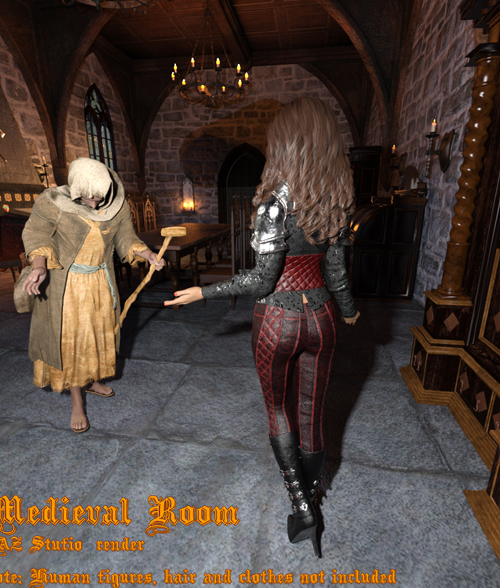
AJ Medieval Room package contains 1 base room figure, consisting of 6 parts, 4 mat-poses for this figure (2 for the FireFly render and 2 only for the Poser 12 SuperFly render) +1 default mat-pose, and 5 props: Bureau, Cabinet, Chair (single), Chairs (group) and Table.
The visibility of the each part of the figure can be disabled if it needed.
Package also contains material presets for using this product in DAZ Studio with NVIDIA Iray render.
This package will be an excellent basis for your pictures and I hope that you will be able to realize your ideas and fantasies using this product and I sincerely wish you this. So - it all depends on your imagination :-) Use Image Based Lighting ( IBL ) and increase Shadow Blur Radius, Shadow Samples and Shadow Min Bias in light properties tab of Poser application for other non-IBL lights. Combine this parameters to achieve best rendering results.
Before using this product in your scenes, please, disable from Poser menu: Display-Ground Shadows and Display-Guides-Ground Plane.
Also disable the "Smooth polygons" checkbox before render in Render Settings!
Product includes geometry (*.obj) file in Geometries folder.
Use Poser 6 or above version of Poser application. For SuperFly render use Poser 12 program.
--------------------------------------
System Requirements:
PC (Not tested in Mac)
Poser 6 and above.
Product can be used in Daz Studio with some materials tuning.
Product ID: 154571-RO
Detail Link: https://www.renderosity.com/marketplace/products/154571
DOWNLOADYou must login to show this link. No account? Create One
Category: Daz & Poser
Detail Link: https://www.renderosity.com/marketplace/products/154571
DOWNLOADYou must login to show this link. No account? Create One