
Exnem dForce Spartan Dress for Genesis 8 Female
Related Articles
?3DMax] VrayArt VRay Exterior Training Models and work files only
On 04-Jul-15
by
VrayArt VRay Exterior Training Models and work files only max | 3D models |...
VrayArt VRay Exterior Training Models and work files only max | 3D models |...
Exnem dForce Mystic Outfit for Gensis 8 Female
On 18-Feb-24
by
This Package contains the "Mystic Outfit" meshes for Daz Studio and...
This Package contains the "Mystic Outfit" meshes for Daz Studio and...
Maxwell Render Full Material Library 2006-2013
On 13-Jul-15
by
Maxwell Render Full Material Library 2006-2013 MXM | JPEG | Shaders | 8.82 GB...
Maxwell Render Full Material Library 2006-2013 MXM | JPEG | Shaders | 8.82 GB...
Maxwell Render Full Material Library 2006-2O13
On 22-Apr-16
by
Maxwell Render Full Material Library 2006-2013 MXM | JPEG | Shaders | 8.82 GB...
Maxwell Render Full Material Library 2006-2013 MXM | JPEG | Shaders | 8.82 GB...
9MBI – The Entire Site
On 09-May-23
by
...
...
Exnem dForce Amazon Outfit for Genesis 8 Female
On 15-Jan-24
by
This Package contains the "Amazon Outfit" meshes for Daz Studio and...
This Package contains the "Amazon Outfit" meshes for Daz Studio and...
Interrogation II: Core Pack
On 23-Feb-25
by
Note: PRODUCT BELOW DESCRIBED FOR DAZ STUDIO. POSER VERSION IS AVAILABLE AS...
Note: PRODUCT BELOW DESCRIBED FOR DAZ STUDIO. POSER VERSION IS AVAILABLE AS...
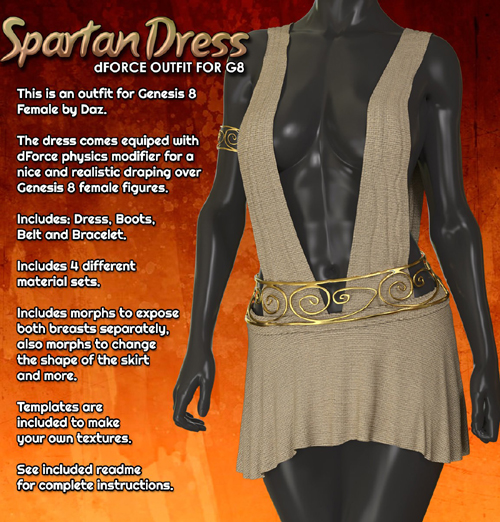
This Package contains the "Spartan Dress" mesh for Daz Studio and Iray, for use with Genesis 8 Female. It comes rigged and also with added dForce physics modifier for a more realistic bending and draping over Genesis 8 figures.
Included is the Spartan Dress Figure, Boots, Belt, Bracelet and 4 different material styles which you can find in the materials folder.
IMPORTANT NOTE:
To use correctly please set the pose you want to render at least a second into animation, that is set your desired pose at frame 30 and simulate using the included Simulation Settings preset (leave the zero pose at frame 1). This will allow the dress to have enough time to drape and settle correctly over the legs.
Morphs Included:
Coverage Right
Expose Breast Left In
Expose Breast Left Out
Expose Breast Right In
Expose Breast Right Out
FBMExpandAll
Shoulder Off Left
Shoulder Off Right
Skirt Back Length
Skirt Front Length
Skirt Length
System Requirements:
DAZ Studio 4.10+
Ownership Statement:
All of this product's content was created by Exnem
Needed Files:
Genesis 8 Female
Installation Instructions:
Extract the zip-archive with your unzip program:
- Open your unzip program and press the button -Extract To-
- Make sure that an option to extract full paths is selected to make sure you keep the right folder structures within your DAZ folder.
Usage Tips or Limitations:
To use correctly you have to follow this steps for each part:
1) Load your Genesis 8 figure (it may be already morphed if you wish)
2) Load the Dress by double clicking while the G8 Figure is selected.
3) Apply the materials you want from the Materials folder.
4) Load the Simulation Setting preset.
5) Pose your Genesis 8 Figure at frame 30 of the simulation (leave the zero pose at frame 1)
Product ID: 159363-RO
Detail Link: https://www.renderosity.com/marketplace/products/159363
DOWNLOADYou must login to show this link. No account? Create One
Category: Daz & Poser
Detail Link: https://www.renderosity.com/marketplace/products/159363
DOWNLOADYou must login to show this link. No account? Create One