
Lilith Gown
Related Articles
Chassia Outfit G8F/G9F
On 11-Dec-23
by
Give your ladies a new sexy outfit, it's sportive, but also ideal for...
Give your ladies a new sexy outfit, it's sportive, but also ideal for...
Venus Outfit G8F
On 12-Feb-24
by
Required 3rd Party Products Genesis 8 Female...
Required 3rd Party Products Genesis 8 Female...
?3DMax] VrayArt VRay Exterior Training Models and work files only
On 04-Jul-15
by
VrayArt VRay Exterior Training Models and work files only max | 3D models |...
VrayArt VRay Exterior Training Models and work files only max | 3D models |...
Tera Outfit G8F
On 28-Feb-24
by
A new stunning outfit for your digital ladies is now ready to play with! You...
A new stunning outfit for your digital ladies is now ready to play with! You...
Sano Suit G8F
On 12-Feb-25
by
A new astonishing suit waits for your Genesis8Females. Purrfect for scifi or...
A new astonishing suit waits for your Genesis8Females. Purrfect for scifi or...
BG3D Maryam for G9 - Bonus Set
On 11-Nov-25
by
DESCRIPTION: My new character Maryam with Bonus Halloween Materials are now...
DESCRIPTION: My new character Maryam with Bonus Halloween Materials are now...
Interrogation II: Core Pack
On 23-Feb-25
by
Note: PRODUCT BELOW DESCRIBED FOR DAZ STUDIO. POSER VERSION IS AVAILABLE AS...
Note: PRODUCT BELOW DESCRIBED FOR DAZ STUDIO. POSER VERSION IS AVAILABLE AS...
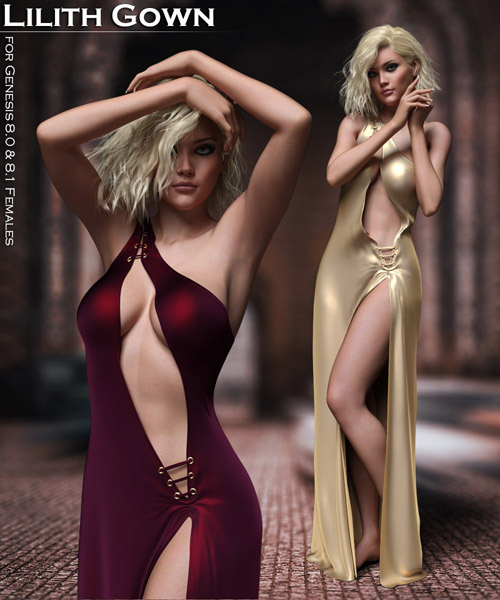
The Lilith Gown is a sexy new dress for the Genesis 8 and 8.1 Females
THIS PACKAGE INCLUDES:
- Lilith Gown
- 8 mesh and lace styles
- 7 solid options
- Silver and gold options for eyelets
The Lilith Gown is dForce enabled, and will not work well without simulation.
The gown includes many custom adjustment and movement morphs to use before and/or after simulation. Many popular body morphs for Genesis 8 and 8.1 have been optimized to improve it's appearance, but other body morphs will work with the autofollow technology.
PLEASE NOTE: Unless you're simulating a flat-footed or sitting style pose, do not use a floor when simulating the Lilith Gown.
IMPORTANT dForce TIPS:
-- Pay attention to your pose, and before simulating, move hands, feet, etc. away from the dress and other body parts if they make contact, so that there is a small gap for the fabic to drape properly. After simulating, you can adjust them back to the desired position.
-- If you get an unwanted result after simulating, experiment with the morphs provided to solve the issue, or use the animated timeline for simulating so that you can pinpoint the problem more easily.
-- Make sure that you use the "Clear" button in between simulations.
-- When using body morphs on your character, it's best to apply them beforehand from a memorized pose, however, when using an animated timeline, I find it's best to apply body morphs at the last frame before simulating.
All material presets are optimized for the Iray Render Engine.
Thanks for stopping by, and I hope you enjoy the Lilith Gown!
Product ID: 161297-RO
Detail Link: https://www.renderosity.com/marketplace/products/161297/lilith-gown
DOWNLOADYou must login to show this link. No account? Create One
Category: Daz & Poser
Detail Link: https://www.renderosity.com/marketplace/products/161297/lilith-gown
DOWNLOADYou must login to show this link. No account? Create One