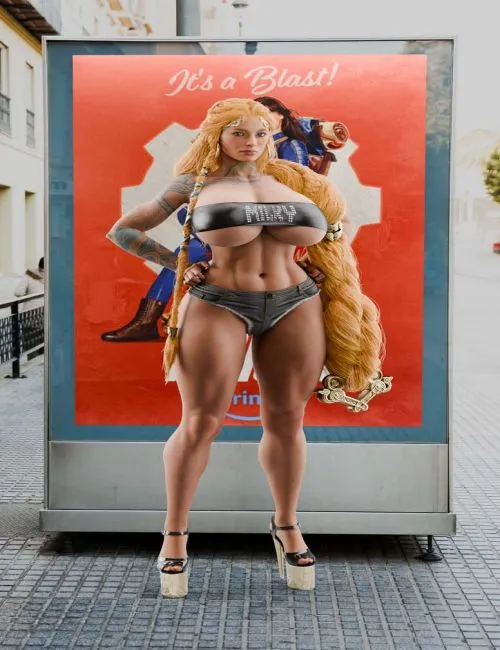
Promo image used: Blender, X-Fashion Life Style Short, Nikkohl Teaser Platform Heels, Sif for Genesis 8 and 8.1 Female
This one wasn't a request per se, but someone on my Discord server was asking if anyone had seen something along these lines. Obviously the ever-awesome PH3Dee over on Renderhub had their own designs, but I wanted to take a crack at it myself.
Seemed simple enough to make (it wasn't, read the first bullet point below to see why), so I spent a bit of time making something.
This deceptively-simple piece of "clothing" actually has a few features:
Due to the nigh-infinite options for breast size, shape, and positioning, this top comes with a few morphs to adjust the cleavage gap's height, width, depth, and tension as well as morphs to adjust the tension from the side of the breast to the dorsal area. The topology in those areas is also reduced to allow Daz Smoothing to hit a bit harder and keep those areas "tighter" after Smoothing is finished. It also comes with an overall strap width morph to make it thinner. If you need further scaling due to the breasts stretching up the straps along the breasts themselves, expand the Top itself in the scene tab and fiddle with the "Y Scale" slider on each pectoral bone ON THE TOP for better results.
Comes with three different "base" material options - Cloth, Latex, and Leather - as well as four color options. Apply a base material first, then select your color. The base color textures included are color-neutral as well, which means you can have a custom color by simply adjusting the value of the base color box in Surfaces.
Also comes with a "Rhinestone" geoshell overlay parented to the Top. This geoshell is hidden by default, and when turned on will allow you to use the materials found in the "Rhinestone" folder to display text across the strap (as seen in the promo image). When using the Rhinestone material preset, BE SURE you have the correct item selected in the Scene tab before applying the preset. The "Top" presets give the top itself a black rhinestone "backing" in the Diffuse Overlay channel to help the rhinestones show up a little better on lighter colors. The "Geo" presets give the geoshell the desired word(s) displayed in blinged up gemstones. AGAIN, ensure you have the CORRECT OBJECT SELECTED in the Scene tab before applying the presets.
If you have trouble with this one, come back to this post and read the bulleted points again, because that's a readme!
This does NOT come with breast compression morphs, but I might be tempted to release some if people want them.