
dforce - Beach Skirt - Genesis 8 and 9
--- PLEASE BE SURE TO READ THE INSTRUCTION .PDF FOR BEST RESULTS! --- The...
Enjoy a super realistic photoscanned rocky beach! This set consists of 3 beach...
This product includes the following products CJ Evangeline HD For Genesis 9 CJ...
Description Beach Girls 3D models of cute girls in swimsuits with many...
This outfit consists of a top (with dforce addon), pleated skirt and panties....
VrayArt VRay Exterior Training Models and work files only max | 3D models |...
Looking for a high-quality, innovative product that will elevate your 3d...
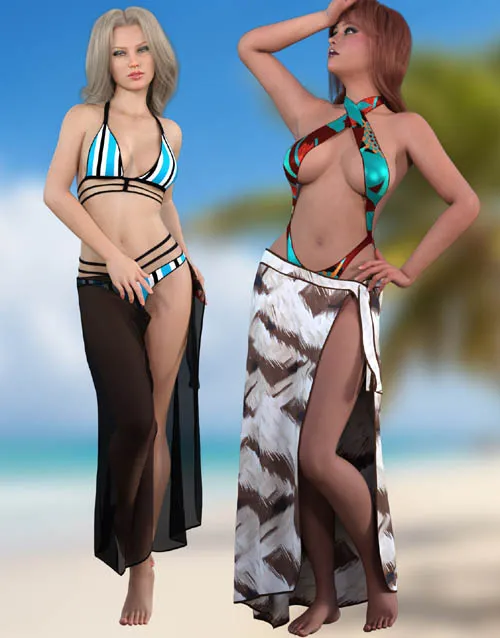
Enjoy your day at the beach with this versatile Skirt to wear over your favorite swimwear for Genesis 8 and 9. dForce is required.
Beach Skirt includes:
1 Skirt for Genesis 8/8.1/9
Detailed Textures
Bump and Transparency Maps
Materials:
14 Material Presets for the Skirt
Simulation Settings
4 Simulation settings
A Variety of Adjustment morphs are included to add to ease of use.
dforce is required.
Simulations should be done using the following method:
1. Load the clothing item.
2. At frame 1 apply any style adjustments.
3. Move your timeline slider to frame 15 and apply any body shapes.
4. Move your timeline slider to frame 20 and apply your pose. Simulate using at least 60 frames for best results. More frames will allow your clothes more time to settle.
5. Animated simulation should be used. Use untied morph at frame one for best results when using the untied animations.
Please note that when using material presets from addons by other vendors they may alter the simulation settings. For this reason it is recommended that you apply the default simulation settings preset after applying any materials from addon packages.
Detail Link: https://www.renderosity.com/marketplace/products/168899
DOWNLOADYou must login to show this link. No account? Create One