
dforce - She - Genesis 8
Related Articles
She-Woman Outfit G8.1F/G8F
On 23-Oct-23
by
She-Woman outfit includes(now with improved armor textures) She-Woman Boots...
She-Woman outfit includes(now with improved armor textures) She-Woman Boots...
Vysiana for V4
On 16-Feb-24
by
She stands staring out the window, the dark glass merely reflecting the same...
She stands staring out the window, the dark glass merely reflecting the same...
Lounging in Lace
On 08-May-22
by
Your character will feel confident in her skin with Lounging in Lace. This...
Your character will feel confident in her skin with Lounging in Lace. This...
dForce M8 She Is The Boss for Genesis 9 Textures Add-On
On 02-Jun-26
by
Elevate your Genesis 9 creations with the She is the Boss Ultimate Texture...
Elevate your Genesis 9 creations with the She is the Boss Ultimate Texture...
The Storm Riders Airship
On 15-Dec-23
by
Why, I do wish to present to y'all for your viewin' pleasure, the...
Why, I do wish to present to y'all for your viewin' pleasure, the...
Telesee Character Morph for G8F, 8.1F and G9
On 22-Jan-26
by
Telesee is proud to live up to her reputation she has in the eyes of humans....
Telesee is proud to live up to her reputation she has in the eyes of humans....
AGD Alana for Genesis 8 and 8.1
On 17-Aug-24
by
Introducing AGD Alana for Genesis 8 and 8.1 Female! Alana is not your typical...
Introducing AGD Alana for Genesis 8 and 8.1 Female! Alana is not your typical...
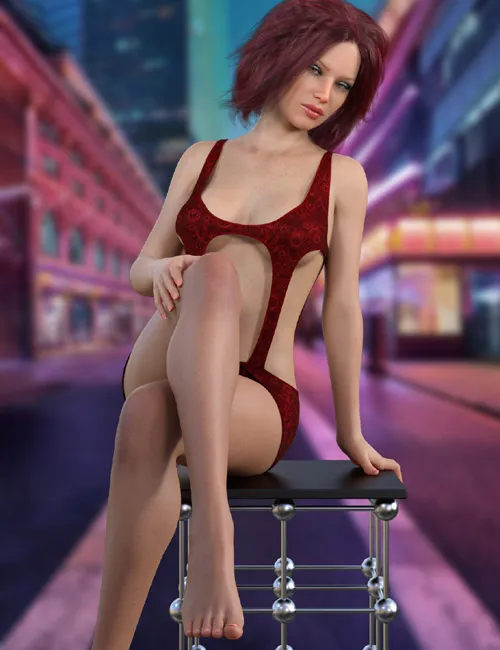
Turn heads with this dress for genesis 8 that defies the ordinary. dforce is required.
She include:
1 Dress for Genesis 8/8.1
Detailed Textures
Bump and Transparency Maps
Bump and Transparency Maps
Materials:
14 Material presets for the Dress
Simulation Settings
3 Simulation Settings for the Dress.
A Variety of Adjustment morphs are included to add to ease of use. Dynamic morphs are also included.
dForce is required.
Simulations should be done using the following method:
1. Load the clothing item.
2. At frame 1 apply any style adjustments.
3. Move your timeline slider to frame 15 and apply any body shapes.
4. Move your timeline slider to frame 20 and apply your pose. Simulate using at least 60 frames for best results. More frames will allow your clothes more time to settle.
5. Animated simulation should be used with larger or more busty characters for best results. Current frame animation is best for thin and small character along with the top tight simulation presets.
You will want to use the Top Loose setting when using the strap down and reveal morphs.
Please note that when using material presets from addons by other vendors they may alter the simulation settings. For this reason it is recommended that you apply the default simulation settings preset after applying any materials from addon packages.
Most body Morphs will work using autofollow technology. Some adjustment may be necessary in extreme poses or with extreme body shapes. Adjustment morphs are included to help with these situations as well as with posing. Autofollow morph results vary.
SUPPORT LINK
Product ID:
DOWNLOAD
Product ID: 170962-RO
Detail Link: https://www.renderosity.com/marketplace/products/170962/dforce-she-genesis-8
DOWNLOADYou must login to show this link. No account? Create One
Category: Daz & Poser
Detail Link: https://www.renderosity.com/marketplace/products/170962/dforce-she-genesis-8
DOWNLOADYou must login to show this link. No account? Create One