
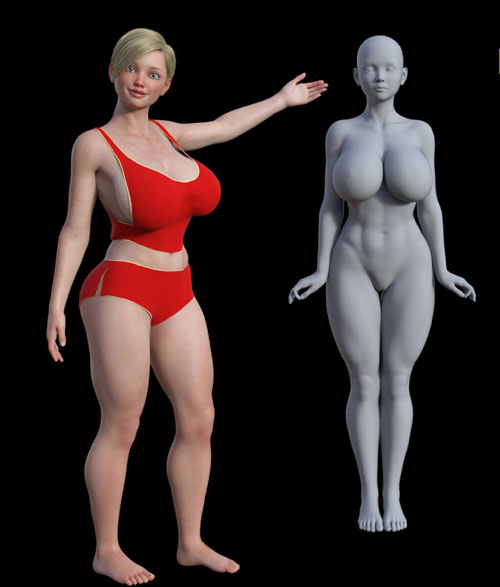
Thea Character Body and Head Morphs for G8F and G8.1F
Related Articles
?3DMax] VrayArt VRay Exterior Training Models and work files only
On 04-Jul-15
by
VrayArt VRay Exterior Training Models and work files only max | 3D models |...
VrayArt VRay Exterior Training Models and work files only max | 3D models |...
[3DMax] Gnomon Workshop Texture Library Bundle
On 02-Aug-15
by
Gnomon Workshop Texture Library Bundle JPEG | TIFF | Textures | 37.2 GB...
Gnomon Workshop Texture Library Bundle JPEG | TIFF | Textures | 37.2 GB...
[Max] VrayArt VRay Exterior Training Models and work files only
On 18-Jul-16
by
VrayArt VRay Exterior Training Models and work files only max | 3D models |...
VrayArt VRay Exterior Training Models and work files only max | 3D models |...
BG3D Maryam for G9 - Bonus Set
On 11-Nov-25
by
DESCRIPTION: My new character Maryam with Bonus Halloween Materials are now...
DESCRIPTION: My new character Maryam with Bonus Halloween Materials are now...
Sunflower Character Body N Head Morphs for Genesis 8 Female
On 04-May-25
by
Sunflower Character Body N Head Morphs for Genesis 8 Female...
Sunflower Character Body N Head Morphs for Genesis 8 Female...
Maxwell Render Full Material Library 2006-2013
On 13-Jul-15
by
Maxwell Render Full Material Library 2006-2013 MXM | JPEG | Shaders | 8.82 GB...
Maxwell Render Full Material Library 2006-2013 MXM | JPEG | Shaders | 8.82 GB...
Maxwell Render Full Material Library 2006-2O13
On 22-Apr-16
by
Maxwell Render Full Material Library 2006-2013 MXM | JPEG | Shaders | 8.82 GB...
Maxwell Render Full Material Library 2006-2013 MXM | JPEG | Shaders | 8.82 GB...
Copyright 2024 by bikdingle
************************************************************
Thea is a busty character for Genesis 8/8.1 Female
You can make her whatever you dream and use her in any way you wish.
System Requirements:
PC/MAC, Daz Studio
Product requirements:
Daz Studio 4.10
Nvidia Iray
Genesis 8 female or Genesis 8.1 female
To install:
Unzip into your Daz3D directory, either the program folder or your "My Library" folder.
To Use:
This product contains only a head and body morph for the character.
It does not include materials, hair or clothing.
This product includes a PDF which outlines the other products I use for my version of the character, Skin, Eyes and Hair.
You can of course make her however you wish or dial her in part way for the character you want her to be.
Using the morphs
You will find apply icons for a Full Thea Apply to your G8F/G8.1F figure and separate apply icons for her head and body in
People >> characters >> bikdingle >> Thea G8
There are also ‘remove’ icons for each option as well.
If you want to work the sliders and not apply her at 100% you will find the sliders in the Parameters Tab under
Morphs >> Bikdingle >>> Thea G8
Product ID: renderhub-thea-character-body-and-head-morphs-for-g8f-and-g8-1f
Detail Link: https://www.renderhub.com/bikdingle/thea-character-body-and-head-morphs-for-g8f-and-g8-1f
DOWNLOADYou must login to show this link. No account? Create One
Category: Daz & Poser
Detail Link: https://www.renderhub.com/bikdingle/thea-character-body-and-head-morphs-for-g8f-and-g8-1f
DOWNLOADYou must login to show this link. No account? Create One