
FPE Jewel Eyes for Genesis 9
Related Articles
BG3D Maryam for G9 - Bonus Set
On 11-Nov-25
by
DESCRIPTION: My new character Maryam with Bonus Halloween Materials are now...
DESCRIPTION: My new character Maryam with Bonus Halloween Materials are now...
[Tutorials] 3DBuzz - Technical Rigging Houdini Volumes 1 - 5
On 20-Mar-16
by
3DBuzz - Technical Rigging Houdini Volumes 1 - 5...
3DBuzz - Technical Rigging Houdini Volumes 1 - 5...
FPE Faceless for Genesis 9
On 06-Dec-23
by
Required Products: Genesis 9 Starter Essentials Like with its Genesis 8 &...
Required Products: Genesis 9 Starter Essentials Like with its Genesis 8 &...
Labworks 2 Equipment Pack 1 for DS and Poser
On 21-Nov-23
by
Product: Labworks 2 Equipment Pack 1 for Daz Studio and Poser Vendor/Creator:...
Product: Labworks 2 Equipment Pack 1 for Daz Studio and Poser Vendor/Creator:...
Texture Booster
On 07-Mar-24
by
Texture Booster is a suite of tools allowing you to control and enhance the...
Texture Booster is a suite of tools allowing you to control and enhance the...
Mastering CGI - Material and Brush Collection
On 18-Dec-17
by
Mastering CGI ? Material and Brush Collection...
Mastering CGI ? Material and Brush Collection...
Millenium Panel Build 12.2016 Plugin for Photoshop (Win/Mac)
On 13-Dec-17
by
Millenium Panel Build 12.2016 Plugin for Photoshop (Win/Mac) for Photoshop CC...
Millenium Panel Build 12.2016 Plugin for Photoshop (Win/Mac) for Photoshop CC...
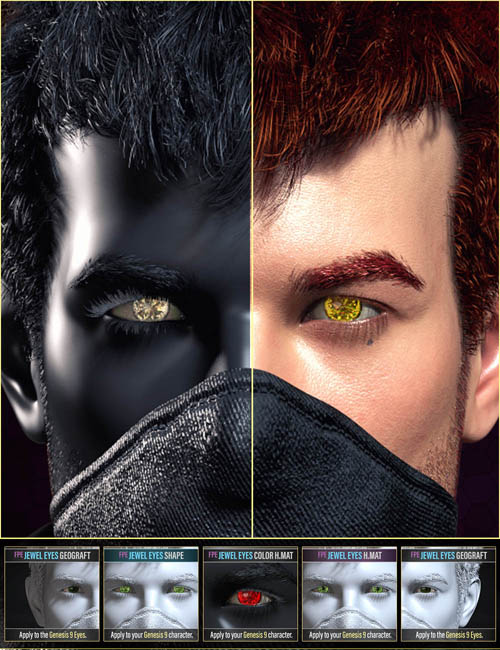
FPE Jewel Eyes for Genesis 9"FPE Jewel Eyes for Genesis 9" plays on a fantasy trope in which characters with gem-like eyes act as symbols of royalty, curses, or other blood-related power. Jewel Eyes helps establish the importance of bloodlines, usually bestowing characters with power and authority.
This pack hopes to provide a tool to bring another layer of fantasy to your stories.
Product Overview:
02 JEWEL EYE GEOGRAFTS
---------------------------
These are applied to the Genesis 9 Eyes to add extra geometry to play with the light. The neutral textures allow you to colorize the Jewels via the surface panel, specifically by changing the Transmission Color. Of course, you can also use the included 17 H.MAT Color Presets can change the look with one click.
03 BASE EYES H.MAT PRESET
---------------------------
A Base Texture Set applied to the Genesis 9 Eyes via one of the three Hierarchical Material Presets (Left Eye, Right Eye, or Both) will allow the Jewel Geograft to light up; through emission and give it a more complex look.
The textures applied are also neutral, allowing you to easily colorize them (if you opt to use them without applying the Geograft Jewels) by changing the Overlay and Emission Colors in the Surface Panel of the Left and Right Eyes.
02 JEWEL EYE MORPHS & 04 Shaping Presets
---------------------------
A Left and Right Morph will allow you to make the pupils smaller or eliminate them, providing the Jewel Look. You can apply them using one of the four Shaping Presets or the Morph Dials in the Parameters Tab.
Product ID: 106637-DAZ
Detail Link: https://www.daz3d.com/fpe-jewel-eyes-for-genesis-9
DOWNLOADYou must login to show this link. No account? Create One
Category: Daz & Poser
Detail Link: https://www.daz3d.com/fpe-jewel-eyes-for-genesis-9
DOWNLOADYou must login to show this link. No account? Create One