
Anime Sky HDRI Plus
Related Articles
Chassia Outfit G8F/G9F
On 11-Dec-23
by
Give your ladies a new sexy outfit, it's sportive, but also ideal for...
Give your ladies a new sexy outfit, it's sportive, but also ideal for...
Venus Outfit G8F
On 12-Feb-24
by
Required 3rd Party Products Genesis 8 Female...
Required 3rd Party Products Genesis 8 Female...
Great Art Now Daz3D Tutorial Bundle
On 02-Jun-23
by
...
...
Unrealengine-Mega-colection-vol.10-Sound Effects
On 11-May-23
by
...
...
Tera Outfit G8F
On 28-Feb-24
by
A new stunning outfit for your digital ladies is now ready to play with! You...
A new stunning outfit for your digital ladies is now ready to play with! You...
Sano Suit G8F
On 12-Feb-25
by
A new astonishing suit waits for your Genesis8Females. Purrfect for scifi or...
A new astonishing suit waits for your Genesis8Females. Purrfect for scifi or...
[repost] DOSCH DESIGN 2D Viz-Images Foreground Plants & Trees
On 06-May-16
by
DOSCH DESIGN 2D Viz-Images Foreground Plants & Trees JPEG | PSD | TIF |...
DOSCH DESIGN 2D Viz-Images Foreground Plants & Trees JPEG | PSD | TIF |...
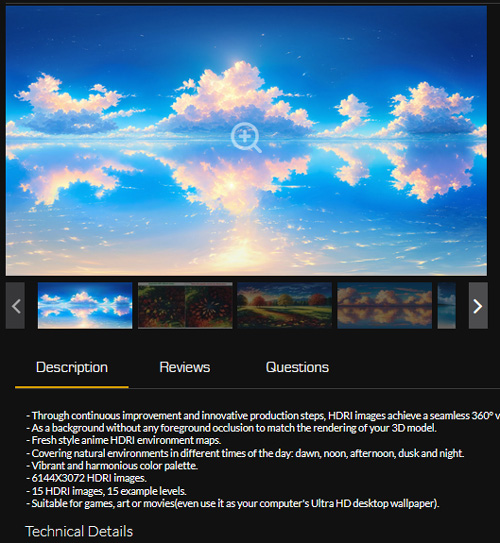
- Through continuous improvement and innovative production steps, HDRI images achieve a seamless 360° view.
- As a background without any foreground occlusion to match the rendering of your 3D model.
- Fresh style anime HDRI environment maps.
- Covering natural environments in different times of the day: dawn, noon, afternoon, dusk and night.
- Vibrant and harmonious color palette.
- 6144X3072 HDRI images.
- 15 HDRI images, 15 example levels.
- Suitable for games, art or movies(even use it as your computer's Ultra HD desktop wallpaper).
Technical Details
Features:
15 HDRI panoramas
15 Map examples
15 JPEG textures
Texture Resolutions:
6144X3072
Supported Development Platforms:
Windows: (Yes)
Mac: (Yes)
Important/Additional Notes:
Important: If the earlier version of UE4 is not compatible, please drag the HDRI image into the Content Browser of UE5 to use it, HDRI path: Your Projects\AnimeSkyHDRIPlus\Content\AnimeSkyHDRIPlus\Textures
Must - Please enable HDRIBackdrop in Edit-Plugins before use (UE5 version has it built-in, UE4 earlier versions need to install it manually)
Optional - You can adjust the HDRI environment brightness in Details-HDRIBackdrop(self)-Intensity (turn off auto exposure to take effect)
Optional - You can adjust the ambient light color that illuminates the objects in HDRIBackdrop(self)-Skylight-Light Color
Tags
Product ID: unrealengine-Anime-Sky-HDRI-Plus
Detail Link: https://www.unrealengine.com/marketplace/en-US/product/anime-sky-hdri-plus
DOWNLOAD: You must login to show this link. No account? Create One
Category: Daz & Poser
Detail Link: https://www.unrealengine.com/marketplace/en-US/product/anime-sky-hdri-plus
DOWNLOAD: You must login to show this link. No account? Create One