
Biomech Subterrane
Related Articles
[3DMax] DOSCH DESIGN HDRI: Underwater
On 15-Mar-15
by
DOSCH DESIGN HDRI: Underwater HDRi | 7.67 GB...
DOSCH DESIGN HDRI: Underwater HDRi | 7.67 GB...
Volumetric Fog & Mist v10.4
On 08-Dec-19
by
Volumetric Fog & Mist v10.4...
Volumetric Fog & Mist v10.4...
[3DMax] DOSCH DESIGN HDRI: Underwater
On 19-Jul-15
by
DOSCH DESIGN HDRI: Underwater HDRi | 7.67 GB...
DOSCH DESIGN HDRI: Underwater HDRi | 7.67 GB...
[3DMax] DOSCH DESIGN HDRI: Underwater
On 21-Apr-16
by
DOSCH DESIGN HDRI: Underwater HDRi | 7.67 GB...
DOSCH DESIGN HDRI: Underwater HDRi | 7.67 GB...
Udemy Advanced interior 3d visualisation in 3ds max and V-ray
On 05-Jun-16
by
Udemy Advanced interior 3d visualisation in 3ds max and V-ray Video: AVC...
Udemy Advanced interior 3d visualisation in 3ds max and V-ray Video: AVC...
[Video training] Udemy Advanced interior 3d visualisation in 3ds max and V-ray
On 07-Nov-16
by
Udemy Advanced interior 3d visualisation in 3ds max and V-ray Video: AVC...
Udemy Advanced interior 3d visualisation in 3ds max and V-ray Video: AVC...
Udemy Advanced interior 3d visualisation in 3ds max and V-ray - repost
On 19-Jan-17
by
Udemy Advanced interior 3d visualisation in 3ds max and V-ray Video: AVC...
Udemy Advanced interior 3d visualisation in 3ds max and V-ray Video: AVC...
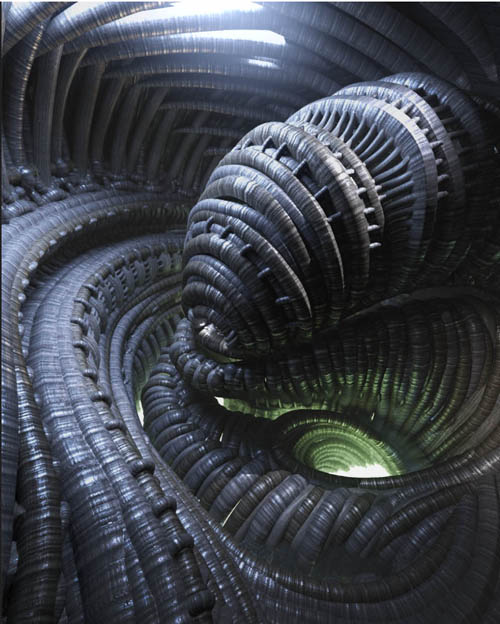
Who or what built the Biomech Subterrane and what mysteries does it hold? Is this going to be another bug hunt or will the secrets of longevity be found? At 150 meters (X,Y,Z) there are plenty of areas to land a ship and explore, including a third of the scene being underwater. There are 12 props including murky water, a glowing light disk, an outer shell, a huge door to close off the scene, and eight props for the interior. The scene can be rearranged, props can be hidden easily, and you can use the props (like the water) in other scenes.
To make set-up-and-render easy, there are nine lights, 26 cameras, HDRI, and four render settings with matte fog and bloom. Materials included are resets (back to default) for the water, light disk, ceiling light (on/off), and a hierarchical preset for the whole environment. All of the textures are tiled so you can increase or decrease the detail. Check the promos for tips, especially the one on how to increase displacement to get more depth out of the textures.
What's Included and Features
Biomech Subterrane: (.DUF)
Scene Subsets:
Biomech Subterrane Full Scene
Zero Props:
BS Ground Light Disk
BS Water
Light Presets:
BS Lights (7 point lights and two spotlights)
Materials:
BS Ceiling n Wall Lights OFF
BS Ceiling n Wall Lights ON
BS Ground Light Disk
BS Materials Reset
BS Water
Render settings:
BS Render Setting wBloom
BS Render Setting wFog and Bloom
BS Render Setting wFog
BS Render Setting
Textures Include:
15 Texture and HDRI Maps (2048 x 1024)
Daz Studio Iray Material Presets (.DUF)
Notes
Product ID: 92477-DAZ
Detail Link: https://www.daz3d.com/biomech-subterrane
DOWNLOADYou must login to show this link. No account? Create One
Category: Daz & Poser
Detail Link: https://www.daz3d.com/biomech-subterrane
DOWNLOADYou must login to show this link. No account? Create One