
FPE HD Face Wounds for Genesis 9
Related Articles
FPE HD Body Wounds for Genesis 9
On 07-Nov-24
by
FPE HD Body Wounds for Genesis 9 is a pack of 11 different wounds (plus ten...
FPE HD Body Wounds for Genesis 9 is a pack of 11 different wounds (plus ten...
?3DMax] VrayArt VRay Exterior Training Models and work files only
On 04-Jul-15
by
VrayArt VRay Exterior Training Models and work files only max | 3D models |...
VrayArt VRay Exterior Training Models and work files only max | 3D models |...
FPE HD Limbs Scars Severe for Genesis 9
On 27-Oct-25
by
"FPE HD Limbs Scars Severe" for Genesis 9 is a pack of 10 different...
"FPE HD Limbs Scars Severe" for Genesis 9 is a pack of 10 different...
FPE HD Limbs Scars for Genesis 9
On 12-Jun-24
by
"FPE HD Limbs Scars" for Genesis 9 is a pack of 11 different scars...
"FPE HD Limbs Scars" for Genesis 9 is a pack of 11 different scars...
FPE HD Body Scars for Genesis 9
On 12-Mar-24
by
"FPE HD Body Scars" for Genesis 9 is a pack of 11 different scars...
"FPE HD Body Scars" for Genesis 9 is a pack of 11 different scars...
FPE Fantasy Scarification Body Tattoos Geoshell for Genesis 9
On 18-Sep-24
by
FPE Fantasy Scarification Body Tattoos Geoshell for Genesis 9 consists of...
FPE Fantasy Scarification Body Tattoos Geoshell for Genesis 9 consists of...
[Tutorials] 3DBuzz - Technical Rigging Houdini Volumes 1 - 5
On 20-Mar-16
by
3DBuzz - Technical Rigging Houdini Volumes 1 - 5...
3DBuzz - Technical Rigging Houdini Volumes 1 - 5...
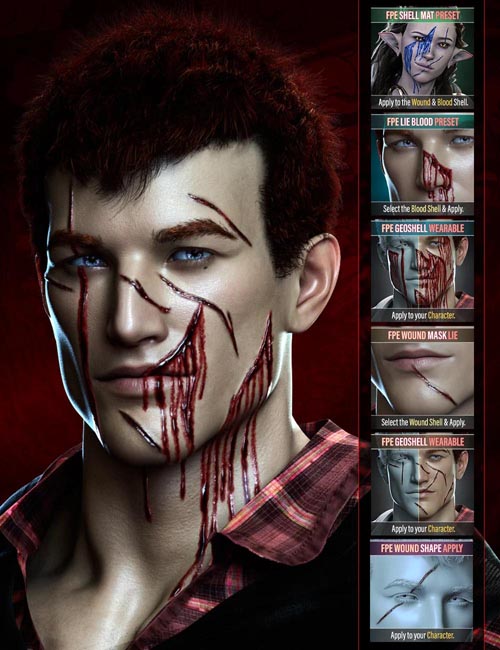
The wound pack has three components to it:
24 HD Morphs | The wounds can be applied via the dials available in the parameters and shaping tabs (which include cards for easy identification) or the handy shaping presets, including a preset to zero all the Wound morphs of this pack out. Since the morphs are HD, the character must be set to a SubDivision of 3 or 4 for them to show. Scripts to change the SubD Render Level are included!
The textures are applied via two Geoshells, one which controls the wound and the other which controls the blood trail. Not only do we ensure the final look of the application is maintained regardless of whether your character uses Iray Uber or PBRShader skin, but we also create a non-destructive way of applying the wound texture. The versatility of Geoshell allows you to quickly and efficiently build, change, tweak, and/or delete wounds and blood without affecting or altering your character's underlying skin.
1 Wound Geoshell and 24 LIE Presets | As with the rest of our recent products, a general wound texture is pre-applied to Geoshell. This means the wound shows up through masks applied via LIE, making the process fast and painless.
1 Wound Blood Geoshell and 24 LIE Presets | The Blood trail has some textures pre-applied to the shell. However, to allow stacking, each LIE must apply four textures onto different channels, making this application somewhat slower than the wound one.
15 Utility Presets to refine the Geoshells are included. The textures should blend with all skin colors, but feel free to experiment by changing the base and translucency colors. Of course, we included instructions via several scripts detailing the application process, troubleshooting, and some tips on how to use these extra presets.
The Wounds will only appear once you've applied one of the Layered Image Editor (LIE) Presets onto the Geoshells. A preset and script to clear the LIE has also been supplied.
>>>> CREATING AN ECOSYSTEM <<<<
Product ID: 101834-DAZ
Detail Link: https://www.daz3d.com/fpe-hd-face-wounds-for-genesis-9
DOWNLOADYou must login to show this link. No account? Create One
Category: Daz & Poser
Detail Link: https://www.daz3d.com/fpe-hd-face-wounds-for-genesis-9
DOWNLOADYou must login to show this link. No account? Create One