
Expression Randomizer for Genesis 9
Related Articles
[3DMax] Gnomon Workshop Texture Library Bundle
On 02-Aug-15
by
Gnomon Workshop Texture Library Bundle JPEG | TIFF | Textures | 37.2 GB...
Gnomon Workshop Texture Library Bundle JPEG | TIFF | Textures | 37.2 GB...
?3DMax] VrayArt VRay Exterior Training Models and work files only
On 04-Jul-15
by
VrayArt VRay Exterior Training Models and work files only max | 3D models |...
VrayArt VRay Exterior Training Models and work files only max | 3D models |...
[Max] VrayArt VRay Exterior Training Models and work files only
On 18-Jul-16
by
VrayArt VRay Exterior Training Models and work files only max | 3D models |...
VrayArt VRay Exterior Training Models and work files only max | 3D models |...
Shapes Randomizer For Genesis 9
On 02-Mar-24
by
Welcome to the Shapes Randomizer for Genesis 9. This product will let you...
Welcome to the Shapes Randomizer for Genesis 9. This product will let you...
[Max] Forza Motorsport 4 Complete Collection Car & Drive Out 3DMax Models
On 06-Dec-15
by
Forza Motorsport 4 Complete Collection Car & Drive Out 3DMax Models max |...
Forza Motorsport 4 Complete Collection Car & Drive Out 3DMax Models max |...
Ultimate Characters Randomizer for G9
On 29-Jun-25
by
- 12 Special custom morphs for G9 (work with feminine or masculine) - 1 Script...
- 12 Special custom morphs for G9 (work with feminine or masculine) - 1 Script...
[Max] Viz-people : 3D Fabrics
On 18-Jun-14
by
Viz-people : 3D Fabrics max | 3D models | 12 GB...
Viz-people : 3D Fabrics max | 3D models | 12 GB...
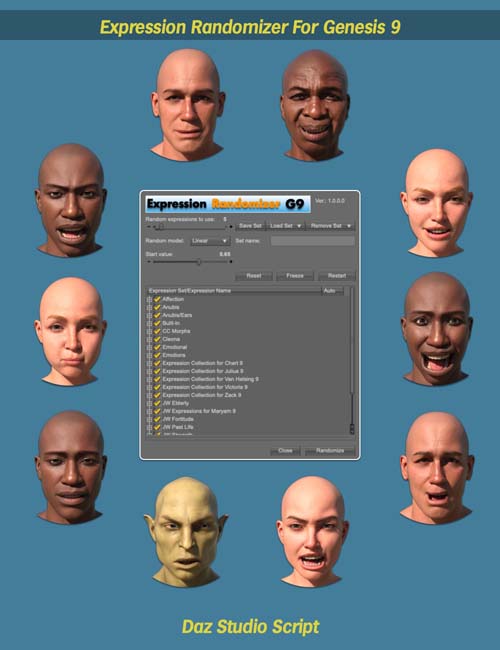
With Expression Randomizer for Genesis 9 you can quickly create unique expressions for your figures by randomly mixing between every expression you have in your library. The more the merrier. But it doesn't stop there. You can create sets of expressions that you want to mix, and only randomize among them. You can enable or disable single expressions, or who sets at once.
You can define static values for some expressions, and then randomize from that, or randomize everything. There are three different random modes, which works differently and create different results. And you can set how many expressions you want to randomize from, and also set limit values.
The modes are:
Random: Pure random, every expression will get a value between your min and max values.
Linear: You set a max value, which is set for the first expression, then the next gets a little less,
the next even less, a linear fall off.
Steep: Similar to the Linear mode, but falls steeper in the beginning and then flattens out.
This way you have different ways of randomizing the expressions.
When you have randomized an expression, you can get a recipe for it, that you can save in a text file, to later recreate that expression. You can also share recipes with other people, and as long as they have the expressions installed, they will get the same result. If they lack some or the expressions, the look will not be the same, but that also depends on how high the value for missing expressions were.
For the promo images I used all expressions I have installed. Each of the expressions in the promos has their recipes so you see what were used. They are too many to list in the used in promos list.
Product ID: 94186-DAZ
Detail Link: https://www.daz3d.com/expression-randomizer-for-genesis-9
DOWNLOADYou must login to show this link. No account? Create One
Category: Daz & Poser
Detail Link: https://www.daz3d.com/expression-randomizer-for-genesis-9
DOWNLOADYou must login to show this link. No account? Create One