
dforce - Tension - Genesis 8
Related Articles
dforce - Ruffled Camisole - Genesis 8
On 19-Aug-24
by
This cute little Camisole is the perfect addition to any girls closet. Pair it...
This cute little Camisole is the perfect addition to any girls closet. Pair it...
?3DMax] VrayArt VRay Exterior Training Models and work files only
On 04-Jul-15
by
VrayArt VRay Exterior Training Models and work files only max | 3D models |...
VrayArt VRay Exterior Training Models and work files only max | 3D models |...
dforce - Off Shoulder Crop Tee - Genesis 8
On 01-May-24
by
A girl can never have enough sexy little tee shirts and this one does not...
A girl can never have enough sexy little tee shirts and this one does not...
dforce - Athena - Genesis 8
On 19-Feb-24
by
Unleash your inner goddess in this sexy goddess inspired dress for genesis 8....
Unleash your inner goddess in this sexy goddess inspired dress for genesis 8....
dforce - Passion Wish Lingerie - Genesis 8
On 04-Feb-24
by
Unwrap your greatest desire in this sexy lingerie set for Genesis 8/8.1 dforce...
Unwrap your greatest desire in this sexy lingerie set for Genesis 8/8.1 dforce...
dforce - Sparkle Fairy - G8
On 04-Oct-24
by
This cute little whimsical dress is perfect for your favorite fairy or free...
This cute little whimsical dress is perfect for your favorite fairy or free...
dforce - Veronica - Genesis 8
On 13-Oct-24
by
Add a cute and stylish little dress to your collection. Versatile and cute...
Add a cute and stylish little dress to your collection. Versatile and cute...
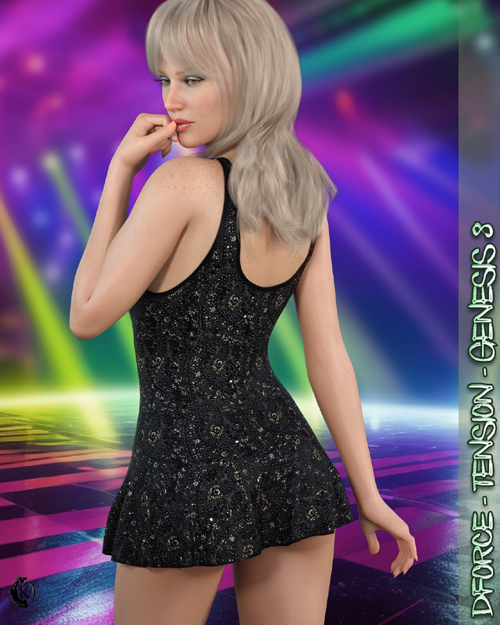
Make them sweat in this hot little ultra short ruffled mini dress. dforce is required.
Tensionincludes:
1 Dress for Genesis 8/8.1
Detailed Textures
Bump and Transparency Maps
Materials:
12 Material Presets for the dress
3 Simulation Presets for the dress
A Variety of Adjustment morphs are included to add to ease of use.
dforce is required.
Simulations should be done using the following method:
1. Load the clothing item.
2. At frame 1 apply any style adjustments.
3. Move your timeline slider to frame 15 and apply any body shapes.
4. Move your timeline slider to frame 20 - 25 and apply your pose. Simulate using at least 30 frames. More frames will allow your dress more time to settle.
5. Animated simulation should be used with larger or more busty characters for best results. If you find the top and panty too loose on smaller, thin characters current frame is a good option. You may also want to use the tighter presets on thinner characters.
Please note that when using material presets from addons by other vendors they may alter the simulation settings. For this reason it is recommended that you apply the default simulation settings preset after applying any materials from addon packages.
Clothing loads with dforce settings already applied. You can adapt them to your liking by changing them in the surfaces tab.Most body Morphs will work using autofollow technology. Some adjustment may be necessary in extreme poses or with extreme body shapes. Adjustment morphs are included to help with these situations as well as with posing. Autofollow morph results vary.
Thank you very much for your interest in my products :) Please add me as a favorite vendor and never miss a new release! Like Kaleya3d on Facebook for Promotions, Sneak Peeks and product announcements! https://www.facebook.com/kaleya3d/ You can also follow me on instagram for product images and sneak peeks https://www.instagram.com/kaleya3d/ Twitter @ShadowcatStudio
Product ID: 162370-RO
Detail Link: https://www.renderosity.com/marketplace/products/162370
DOWNLOADYou must login to show this link. No account? Create One
Category: Daz & Poser
Detail Link: https://www.renderosity.com/marketplace/products/162370
DOWNLOADYou must login to show this link. No account? Create One