
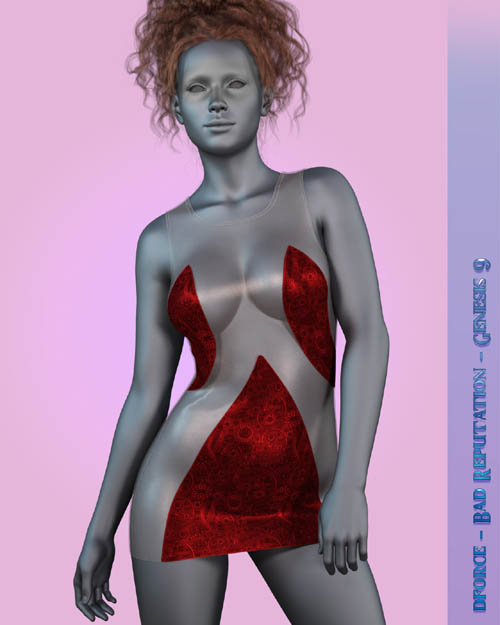
dforce - Bad Reputation - Genesis 9
Related Articles
?3DMax] VrayArt VRay Exterior Training Models and work files only
On 04-Jul-15
by
VrayArt VRay Exterior Training Models and work files only max | 3D models |...
VrayArt VRay Exterior Training Models and work files only max | 3D models |...
dforce - Hot Hoody - Genesis 8
On 17-Apr-25
by
This sexy, trendy hoody dress is perfect for a night out or as a cover up over...
This sexy, trendy hoody dress is perfect for a night out or as a cover up over...
dforce - Trouble II - Genesis 8
On 14-Apr-24
by
Release your mischievous side in this cute, sexy mini dress for Genesis 8/8.1...
Release your mischievous side in this cute, sexy mini dress for Genesis 8/8.1...
dforce - Ruffled Camisole - Genesis 8
On 19-Aug-24
by
This cute little Camisole is the perfect addition to any girls closet. Pair it...
This cute little Camisole is the perfect addition to any girls closet. Pair it...
dforce - Sparkle Fairy - G8
On 04-Oct-24
by
This cute little whimsical dress is perfect for your favorite fairy or free...
This cute little whimsical dress is perfect for your favorite fairy or free...
dforce - Priestess of the Moon - Genesis 8
On 13-Mar-25
by
Bring your fantasies to life with this beautiful fantasy outfit for Genesis 8....
Bring your fantasies to life with this beautiful fantasy outfit for Genesis 8....
dforce - Veronica - Genesis 8
On 13-Oct-24
by
Add a cute and stylish little dress to your collection. Versatile and cute...
Add a cute and stylish little dress to your collection. Versatile and cute...
Detail link:
Show off your wildest side in this daring little dress for Genesis 9 that leaves little to the imagination. dforce is required
Bad Reputation Includes:
1 Dress for Genesis 9
Detailed Textures
Bump and Transparency Maps
Materials:
14 Iray Materials for the Dress
2 Simulation Settings
A Variety of Adjustment morphs are included to add to ease of use.
----------------------------------------------------------------
dforce is required for best results.
Simulations should be done using the following method:
1. Load the clothing item.
2. At frame 1 apply any style adjustments.
3. Move your timeline slider to frame 15 and apply any body shapes.
4. Move your timeline slider to frame 20 or 25 and apply your pose.
5. Set your simulation to animated timeline and at least 30 frames.Set your Collision Mesh Resolution to viewport.
If you want the breasts more covered use the cover breast morphs and the SidesHold simulation setting. Apply these morphs and this setting at frame 1 before simulation. See readme for more usage tips
---------------------------------------------------------------
Dress loads with dforce settings already applied. You can adapt them to your liking by changing them in the surfaces tab. body Morphs will work using autofollow technology. Smoothing can be increased to improve the look of autofollow on more extreme body shapes. Some adjustment may be necessary in extreme poses or with extreme body shapes. Adjustment morphs are included to help with these situations as well as with posing. Autofollow morph results vary.
Thank you very much for your interest in my products :) Please add me as a favorite vendor and never miss a new release! Like Kaleya3d on Facebook for Promotions, Sneak Peeks and product announcements! https://www.facebook.com/kaleya3d/ You can also follow me on instagram for product images and sneak peeks https://www.instagram.com/kaleya3d/ Twitter @ShadowcatStudio
Product ID: 158375-RO
Detail Link: https://www.renderosity.com/marketplace/products/158375
DOWNLOADYou must login to show this link. No account? Create One
Category: Daz & Poser
Detail Link: https://www.renderosity.com/marketplace/products/158375
DOWNLOADYou must login to show this link. No account? Create One